p5.js Session 13: Colour, Hex and Palettes
Session 12 covered RGB and HSB, two ways of describing a colour to p5.js. There is a third, and it is the one you will meet most often outside the editor.
Hex: one more way to write a colour
A hex code looks like #0077B6. The hash is followed by six characters, read as three pairs: 00 for red, 77 for green, B6 for blue. Each pair is one channel written in base 16, which counts 0 to 9 then A to F, so FF is 255 and 00 is 0. It is the same RGB colour, written shorter.
p5.js takes a hex code as a string, quotes included, anywhere it takes a colour. Here is one blue three times over, written three different ways.
function setup() {
  createCanvas(600, 300);
  noLoop();
  noStroke();
}
function draw() {
  background(0);

  // RGB: red, green, blue, each 0 to 255
  fill(0, 119, 182);
  circle(150, 150, 140);

  // Hex: the same colour as a string, three pairs after the hash
  fill('#0077B6');
  circle(300, 150, 140);

  // HSB: hue, saturation, brightness
  colorMode(HSB, 360, 100, 100);
  fill(200.8, 100, 71.4);
  circle(450, 150, 140);
}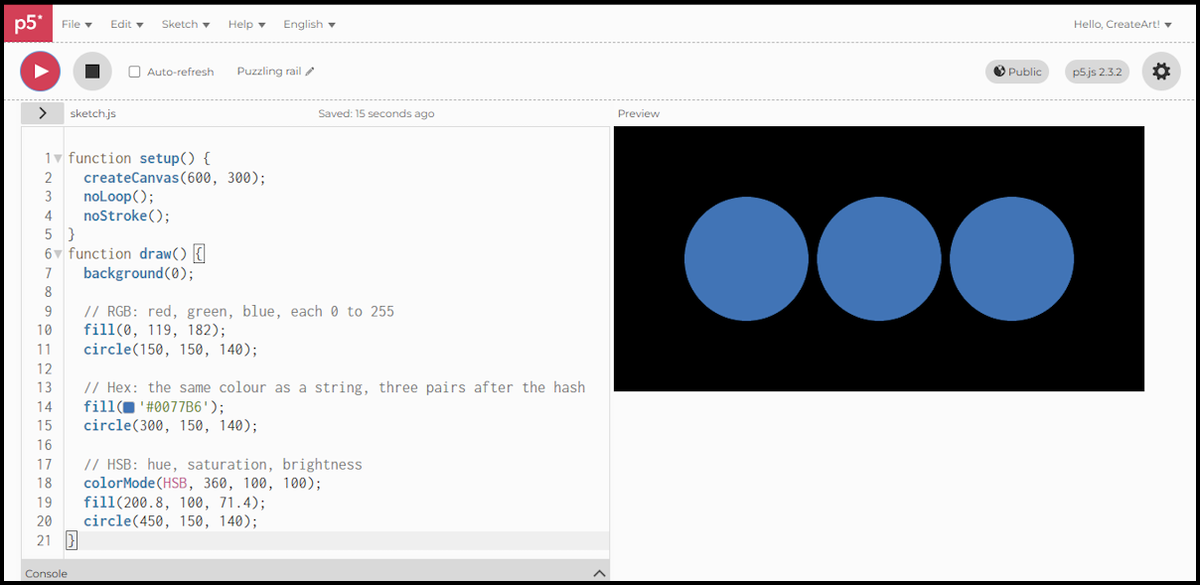
fill(0, 119, 182)andfill('#0077B6')are the same colour.77in hex is 119,B6is 182.- The quotes matter.
'#0077B6'is a string, and p5.js reads a string as a colour. Without them it is not valid code. - The third circle switches over with
colorMode(HSB, 360, 100, 100), then names that same blue as hue 200.8, saturation 100, brightness 71.4. - The decimals are not fussiness. Converting a colour into HSB rarely lands on whole numbers, and rounding them would leave the third circle a shade off the other two.
Hex is worth knowing because it is what the rest of the world uses. Design tools export it, CSS uses it, and every palette site hands you a row of hex codes ready to paste.
Gathering colours into a palette
Generative art rarely picks colours one at a time. It works from a chosen set, and holding that set in an array means you write the codes once and refer to them by position afterwards.
The nine below are Ocean Blue Serenity, taken from the trending palettes on Coolors, which is where I go when I want a set of colours that already agree with each other.
One script does both halves of the job. setup() creates the palette, draw() uses it, one swatch per colour.
let palette;
function setup() {
  createCanvas(650, 350);
  noLoop();
  noStroke();
  palette = [
    '#03045E', '#023E8A', '#0077B6', '#0096C7', '#00B4D8',
    '#48CAE4', '#90E0EF', '#ADE8F4', '#CAF0F8'
  ];
}
function draw() {
  background(0);
  for (let i = 0; i < palette.length; i++) {
    fill(palette[i]);
    rect((i * 70) +10, 50, 70, 250);
  }
}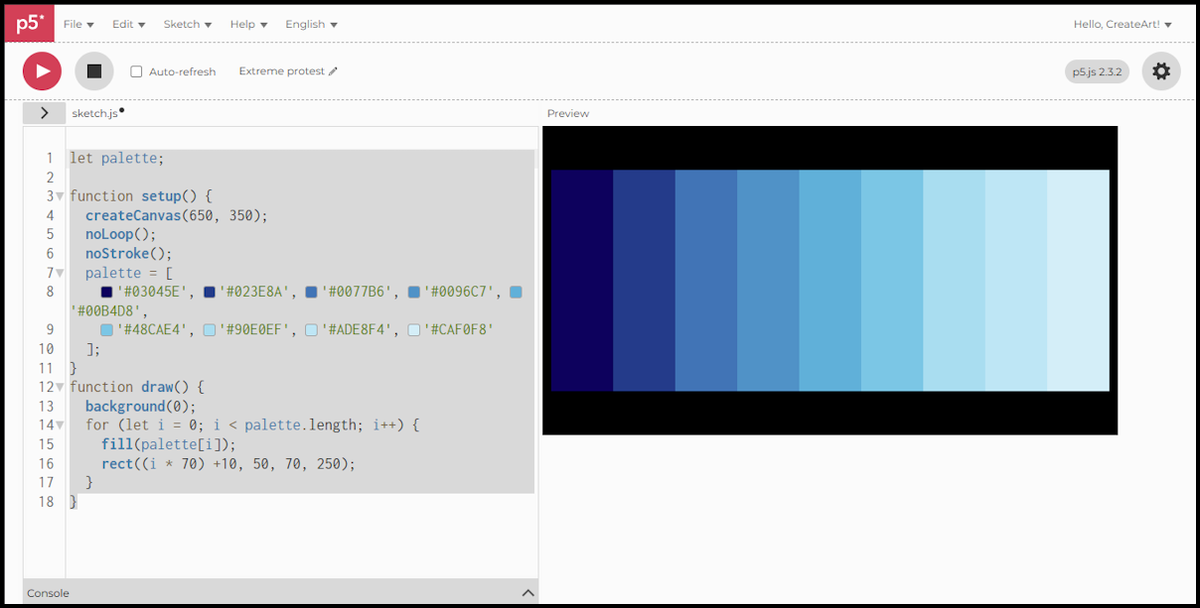
let palette;sits outsidesetup(), so every function in the sketch can see it.- Filling it inside
setup()means it is built once, when the sketch starts, not on every frame. - Square brackets make an array. The nine hex codes go in as strings, separated by commas.
palette[0]is the first colour andpalette[8]the last, because arrays count from 0.palette[i]in the loop is the using half. Swatch one takes colour one, swatch two takes colour two, straight through to the ninth.palette.lengthis 9, so the loop covers the whole palette without you counting anything.
A circle divided among the palette
A palette of nine and a circle of 360 degrees fit together neatly: nine wedges of 40 degrees each, one colour per wedge.
let palette;
function setup() {
  createCanvas(600, 600);
  angleMode(DEGREES);
  noLoop();
  noStroke();
  palette = [
    '#03045E', '#023E8A', '#0077B6', '#0096C7', '#00B4D8',
    '#48CAE4', '#90E0EF', '#ADE8F4', '#CAF0F8'
  ];
}
function draw() {
  background(0);
  let wedgeAngle = 360 / palette.length;
  for (let i = 0; i < palette.length; i++) {
    fill(palette[i]);
    arc(300, 300, 400, 400, i * wedgeAngle, (i + 1) * wedgeAngle, PIE);
  }
}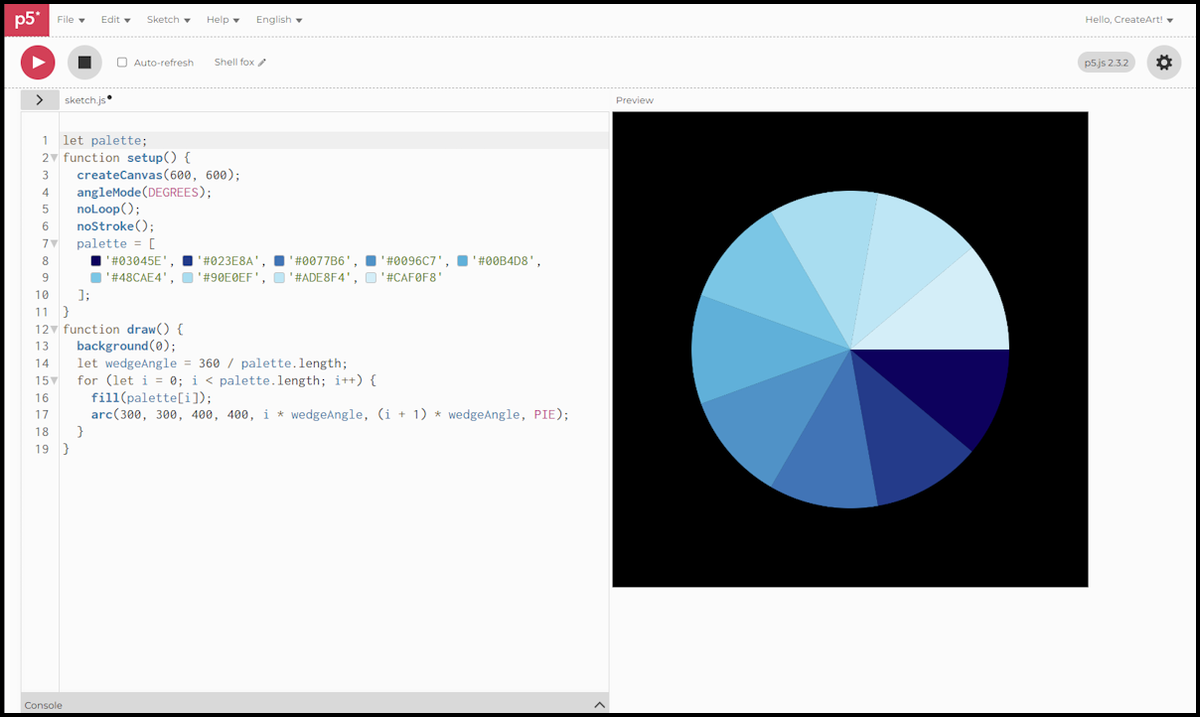
arc(x, y, w, h, start, stop)draws a slice of an ellipse, set by the two angles.PIEcloses that slice back to the centre, which is what makes a wedge rather than a curved line.angleMode(DEGREES), from Session 7, lets the angles be written as 0 to 360 instead of radians.wedgeAngleis360 / palette.length, so the wedges divide the circle evenly whatever size the palette is. Nine colours give 40 degrees each.- Wedge
iruns fromi * wedgeAngleto(i + 1) * wedgeAngle, so each one starts exactly where the last finished.
Nine colours, nine wedges, the whole palette visible at once. Change one hex code and one slice of the circle changes with it.
The scripts in this session were written for p5.js 2.3.2, the version the web editor runs by default.
Next session, we get a sketch out of the browser: saving your work as an image file.