Sixteen sessions of drawing, and two things have interrupted us more than anything else. Neither is about art. Both are about the gap between the code you write and the code p5.js already has.
This last session covers both, then looks back at the ground we have crossed.
Words p5.js has already taken
p5.js gives you hundreds of functions, and a lot of them are ordinary English words. hue, red, green, blue, alpha, saturation, brightness, text, line, key, push, pop, step, size, scale. Every one of those is already a function.
Name a variable after one of them and you have taken the name away from p5.js.
function setup() {
  createCanvas(600, 600);
  colorMode(HSB, 360, 100, 100);
  noLoop();
  noStroke();
}

function draw() {
  background(0);
  let hue = 200;
  fill(hue, 80, 90);
  circle(300, 300, 200);
}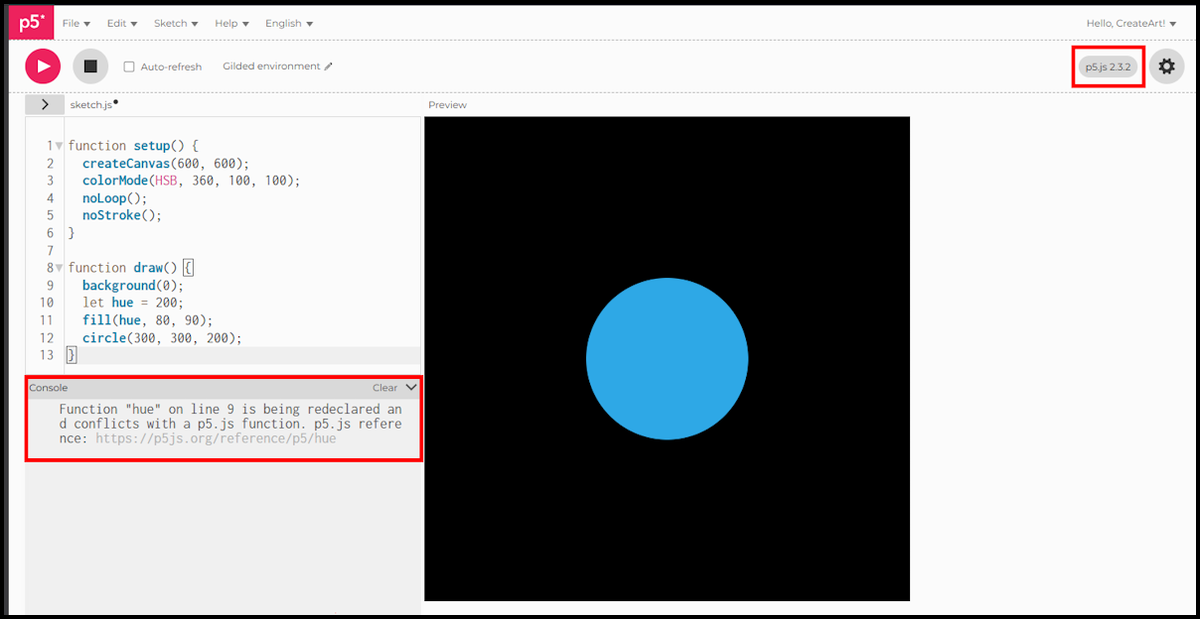
- The sketch still runs. The circle appears exactly as intended, which is why this one is so easy to miss.
- The message lands in the Console under the editor:
Function "hue" on line 9 is being redeclared and conflicts with a p5.js function, with a link to the reference for the realhue(). - Take the line number with a pinch of salt. Here it says line 9 while
let hue = 200;is sitting on line 10. Search for the name rather than counting lines. - The fix is always the same. Rename your variable.
hueValue,myHue,h, anything not already spoken for. - This bites hardest in colour sketches, because the colour words are the obvious names and p5.js has taken nearly all of them.
- Two of this series’ own sketches hit it. Session 12 wanted
huefor a colour and Session 13 wantedstepfor an angle. Both were renamed.
The habit worth forming is small: read the Console even when the sketch looks fine. Nothing was visibly wrong with that circle, and p5.js was still telling us we had taken one of its names.
Telling which p5.js you are running
The other interruption is older code. p5.js 2.0 renamed and removed things, and the internet is full of tutorials written before it.
You will meet this most often with curveVertex(), which drew a curve through a set of points. Here is a sketch of exactly the kind you will find all over the web. It was correct for years.
function setup() {
  createCanvas(600, 600);
  noLoop();
  noStroke();
  fill(250, 250, 50);
}

function draw() {
  background(0);
  beginShape();
  curveVertex(150, 450);
  curveVertex(150, 450);
  curveVertex(300, 150);
  curveVertex(450, 450);
  curveVertex(450, 450);
  endShape();
}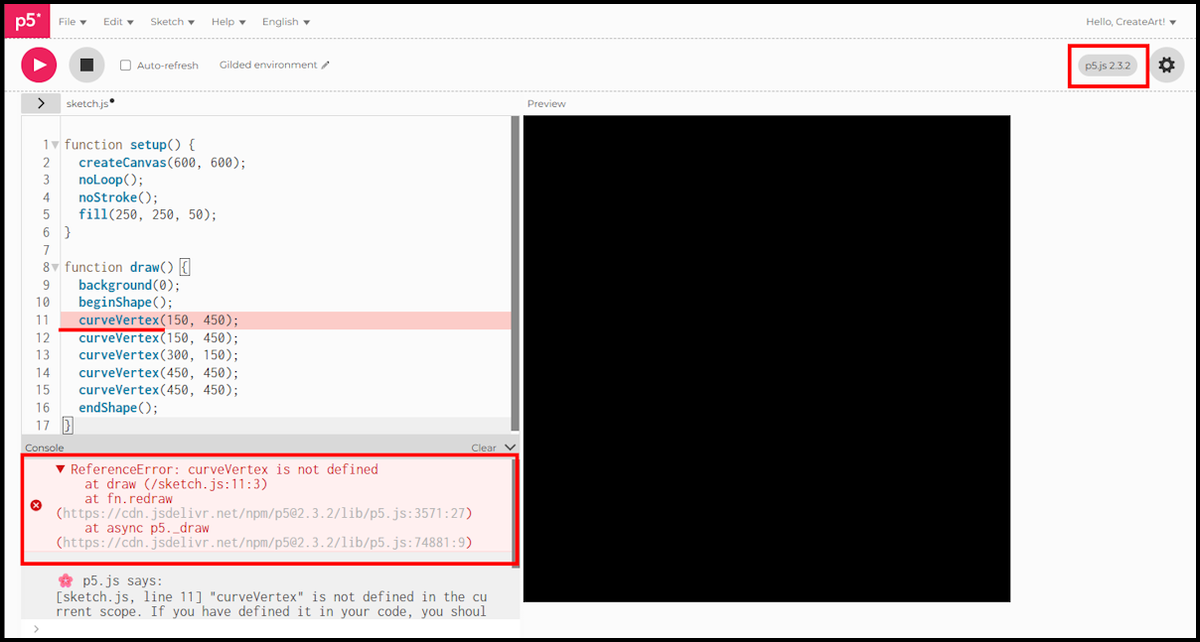
- Nothing is drawn, and the console says
ReferenceError: curveVertex is not defined. The sketch is not wrong, it is old. curveVertex()becamesplineVertex()in p5.js 2.0. Change those five calls and the curve appears.- The repeated first and last points are obsolete too.
splineVertex()runs through every point you give it, so three calls do what five used to. - That is the difference between the two. A warning lets the sketch run anyway, as the
hueone did. An error stops it dead and leaves the canvas empty. - An error also marks the offending line in the editor, and p5.js adds a plain English explanation underneath the red block. The warning did neither.
So how do you know which p5.js you are working in, and whether a tutorial you have found is older than it?
- The version is written on the editor toolbar, top right, next to the settings cog.
- This series lived through the change. Look at the screenshots in Sessions 1 to 10 and the toolbar reads p5.js 1.11.13. From Session 11 onwards it reads 2.3.2, because the editor moved to version 2 partway through.
- That is exactly when
curveVertex()stopped working for us, in the middle of writing Session 11. Nothing in Sessions 1 to 10 broke, but that was luck rather than design. - A
ReferenceErrornaming a function you copied from a tutorial almost always means that function was renamed or removed, not that you typed it wrong. - The current reference at p5js.org is the thing to check. If a function is not there, it does not exist any more.
- The old reference is still online at v1.p5js.org, which is useful for working out what a piece of old code was trying to do.
Sixteen sessions, looking back
- The canvas and shapes, Sessions 1 to 3. The editor,
setup()anddraw(), coordinates, and the built-in shapes. - Repetition, Sessions 4 to 6.
forloops,whileloops, grids, and conditions to vary what lands in them. - Moving the origin, Sessions 7 to 9.
translate(),rotate(),push()andpop(), and your own functions. - Chance, Session 10.
random(),floor(), andswitch, the point where sketches stopped being predictable. - Your own shapes, Session 11.
beginShape(),vertex()andsplineVertex(). - Colour, Sessions 12 and 13. RGB, HSB, opacity, hex, and palettes held in arrays.
- Getting it out, Session 14.
saveCanvas()on a key press, and what pixel density does to the file you get. - Motion, Session 15. Dropping
noLoop(), clearing the canvas, and five balls bouncing off the walls. - Interaction, Session 16.
mouseX,mouseYandmousePressed().
Nothing in that list is advanced. It is the whole vocabulary of an enormous amount of generative art, and every piece of it fits in one page of code.
What comes next
A second series is coming, on harder ground: Perlin noise, flow fields, recursion, and the algorithms that make generative work look organic rather than assembled.
Until then, the most useful thing you can do is stop following. Take the Session 14 grid, change the palette, change the shapes, break it, and see what falls out. That is the whole discipline.
The scripts in this session were written for p5.js 2.3.2, the version the web editor runs by default.
That is the series. Thank you for building along with it.