In Session 10 we let random() decide where, what colour, and what shape to draw. This session steps back to something more basic: shapes p5.js doesn’t already have a name for.
Building a shape from points
rect(), ellipse(), and triangle() cover a lot of ground, but not everything. Let’s build a shape p5.js has no built-in name for, one point at a time.
function setup() {
  createCanvas(600, 600);
  noLoop();
  noStroke();
  fill(250, 250, 50);
}
function draw() {
  background(0);
  beginShape();
  vertex(300, 90);
  vertex(360, 240);
  vertex(510, 240);
  vertex(390, 330);
  vertex(435, 480);
  vertex(300, 390);
  vertex(165, 480);
  vertex(210, 330);
  vertex(90, 240);
  vertex(240, 240);
  endShape(CLOSE);
}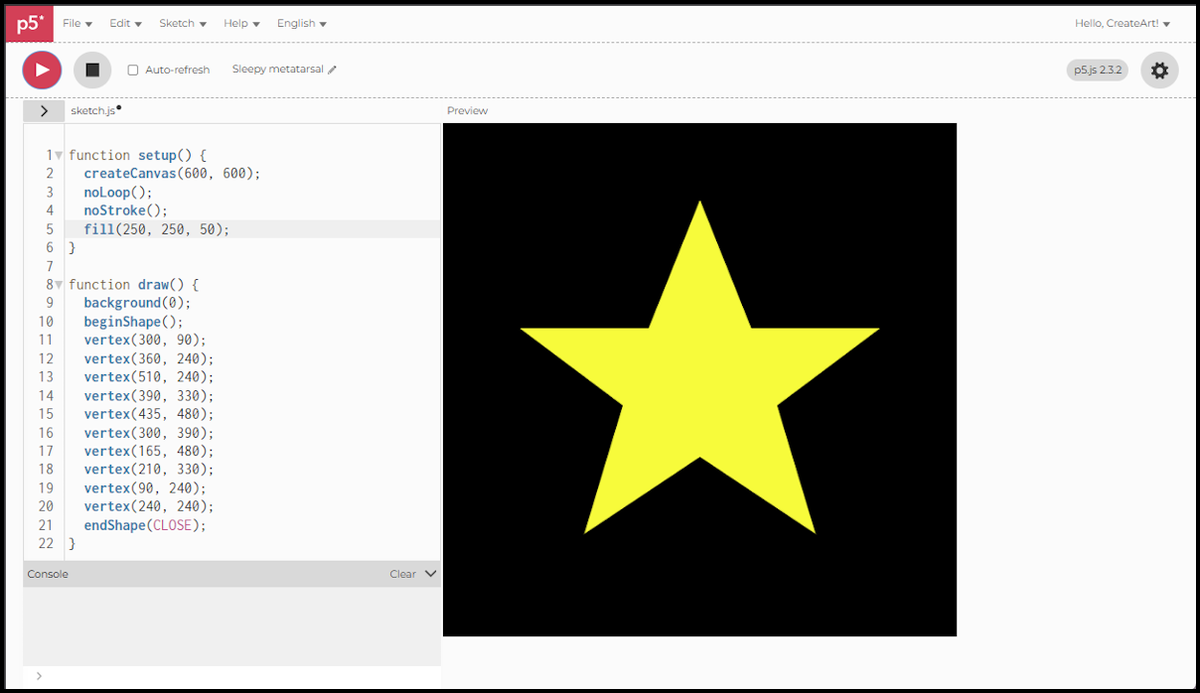
beginShape()opens the shape and starts collecting points. Nothing appears on the canvas yet.vertex(x, y)adds one corner. They connect in the order you call them, so the order is the drawing.endShape(CLOSE)finishes the shape and joins the last point back to the first.
Ten points, and a star comes out. Move any one of them and the star becomes something else entirely, which is the appeal of building shapes this way.
splineVertex(): the same points, a curved line
Same ten points, same star, but this time the edges bend instead of running straight.
function setup() {
  createCanvas(600, 600);
  noLoop();
  noStroke();
  fill(250, 250, 50);
}
function draw() {
  background(0);
  beginShape();
  splineVertex(300, 90);
  splineVertex(360, 240);
  splineVertex(510, 240);
  splineVertex(390, 330);
  splineVertex(435, 480);
  splineVertex(300, 390);
  splineVertex(165, 480);
  splineVertex(210, 330);
  splineVertex(90, 240);
  splineVertex(240, 240);
  endShape(CLOSE);
}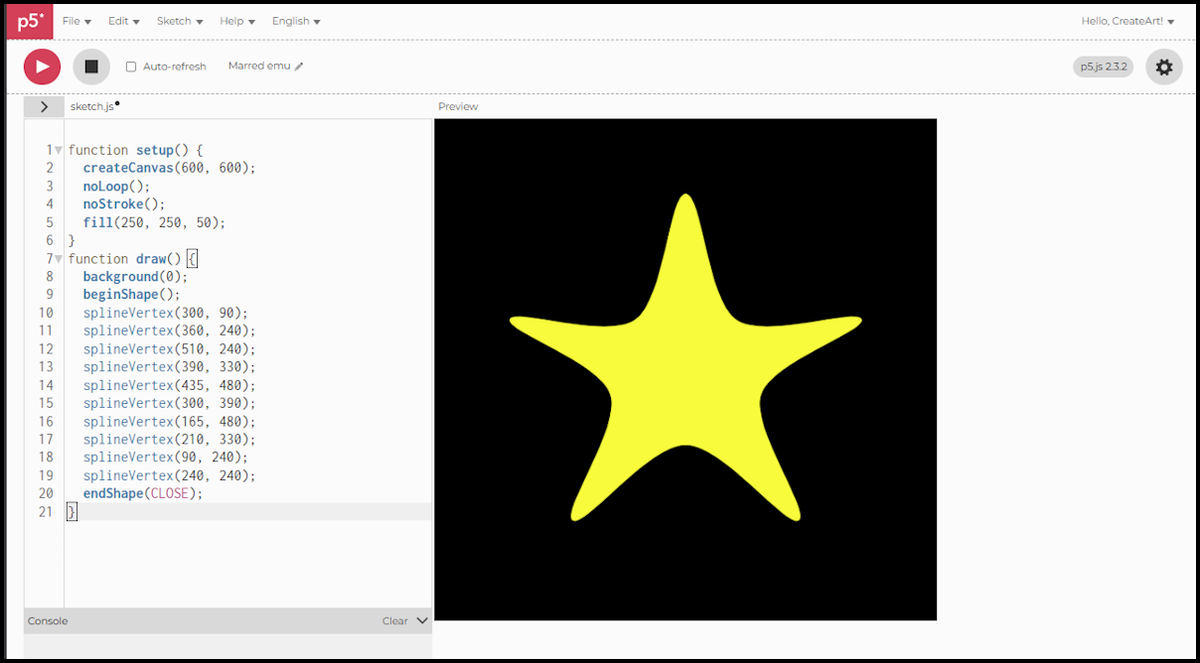
splineVertex(x, y)replacesvertex(x, y), one call per point as before, but the line between the points curves through them instead of running straight.- The curve passes through every point you give it, so the ten points stay exactly where they were.
endShape(CLOSE)still closes the shape, this time joining the last point back to the first with a curve.
The star softens into something closer to a flower. Nothing changed but the word vertex.
One warning if you go looking for more on this. Before p5.js 2.0 the function was called curveVertex(), and it worked differently: the first and last points had to be repeated, because those calls only steered the curve and were never drawn. The same star looked like this:
function setup() {
  createCanvas(600, 600);
  noLoop();
  noStroke();
  fill(250, 250, 50);
}
function draw() {
  background(0);
  beginShape();
  curveVertex(300, 90);
  curveVertex(300, 90);
  curveVertex(360, 240);
  curveVertex(510, 240);
  curveVertex(390, 330);
  curveVertex(435, 480);
  curveVertex(300, 390);
  curveVertex(165, 480);
  curveVertex(210, 330);
  curveVertex(90, 240);
  curveVertex(240, 240);
  curveVertex(300, 90);
  curveVertex(300, 90);
  endShape(CLOSE);
}
Run that in the current editor and you get ReferenceError: curveVertex is not defined. Worth knowing, because a lot of the p5.js writing online still uses the old name.
The scripts in this session were written for p5.js 2.3.2, the version the web editor runs by default. If you are following an older tutorial, some function names will differ. The one that matters here is flagged above.
Next session, we leave shapes behind for colour itself: RGB, HSB, and how to make a sketch shift smoothly through the spectrum.