
In Session 4 we built a grid where every cell looked exactly the same. That uniformity is useful, but it is also a little rigid. In this session we use conditions to make choices, so different cells can look different depending on a rule we define.
What an if statement does
Think about a traffic light. It does not show all three colours at once. It looks at the current state and picks one. An if statement works the same way: it checks whether something is true, and only runs its code if it is.
if (i % 2 === 0) {
  fill(200, 50, 50);
}
% is the remainder operator. i % 2 gives you the remainder when i is divided by 2. When i is 0, 2, or 4 the remainder is 0, so the condition is true and the fill turns red. When i is 1, 3, or 5 the remainder is 1, the condition is false, and the fill is not changed.
Here is a row of circles using that condition. Every circle starts at size 40. The if makes every other one larger. When the condition is false, nothing changes.
function setup() {
  createCanvas(600, 200);
  noLoop();
}
function draw() {
  background(0);
  fill(200, 50, 50);
  noStroke();
  for (let i = 0; i < 6; i++) {
    let d = 40;
    if (i % 2 === 0) {
      d = 80;
    }
    ellipse(75 + i * 90, 100, d, d);
  }
}
// what each line does inside the loop:
// let d = 40 <- start with a default diameter every time
// if (i % 2 === 0) <- check: is this an even position?
// d = 80 <- yes: override the diameter
// <- no: d stays at 40, nothing else happens
// ellipse(...) <- draws using whichever d was set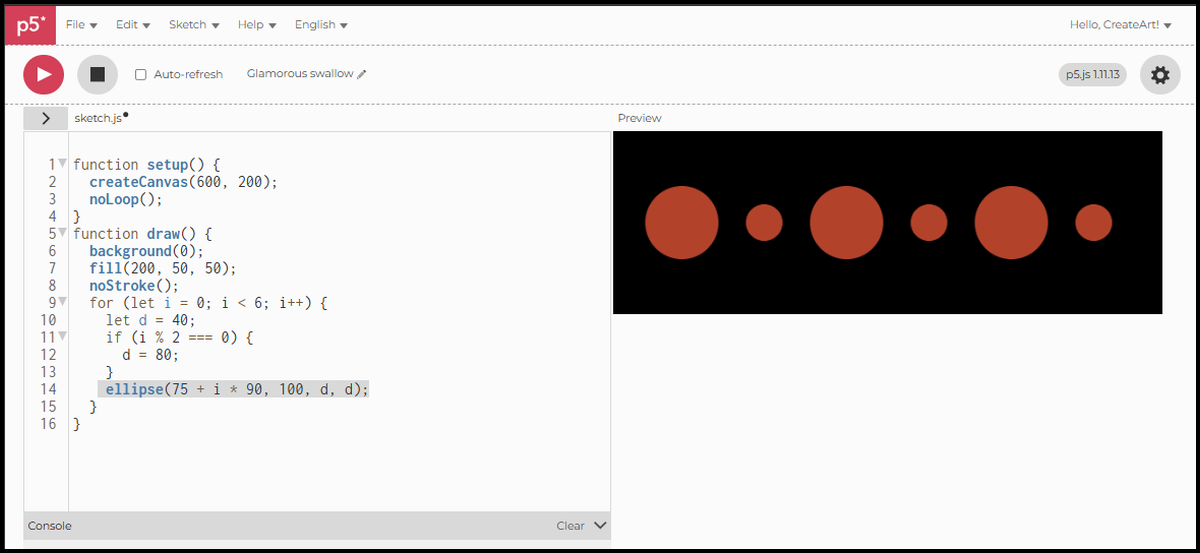
The if / else statement
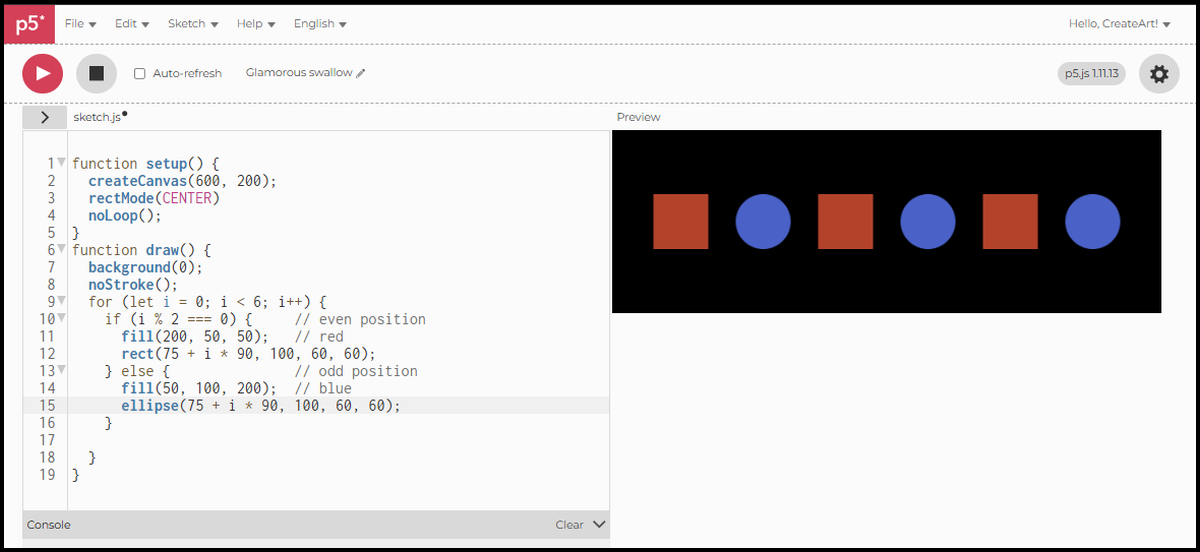
A plain if only acts when the condition is true, and does nothing when it is false. if / else covers both cases explicitly: one outcome when the condition is true, a different one when it is not.
function setup() {
  createCanvas(600, 200);
  rectMode(CENTER);
  noLoop();
}
function draw() {
  background(0);
  noStroke();
  for (let i = 0; i < 6; i++) {
    if (i % 2 === 0) {     // even position
      fill(200, 50, 50);   // red
      rect(75 + i * 90, 100, 60, 60);
    } else {               // odd position
      fill(50, 100, 200);  // blue
      ellipse(75 + i * 90, 100, 60, 60);
    }
  }
}
// what each line does inside the loop:
// if (i % 2 === 0) <- check: is this an even position?
// fill(200, 50, 50) <- yes: red fill
// rect(...) <- and draw a square
// else <- no, it must be odd
// fill(50, 100, 200) <- blue fill
// ellipse(...) <- and draw a circleEvery shape is handled by one branch or the other. Not just the colour changes — the shape itself changes. Each branch is completely independent.
The if / else if / else statement
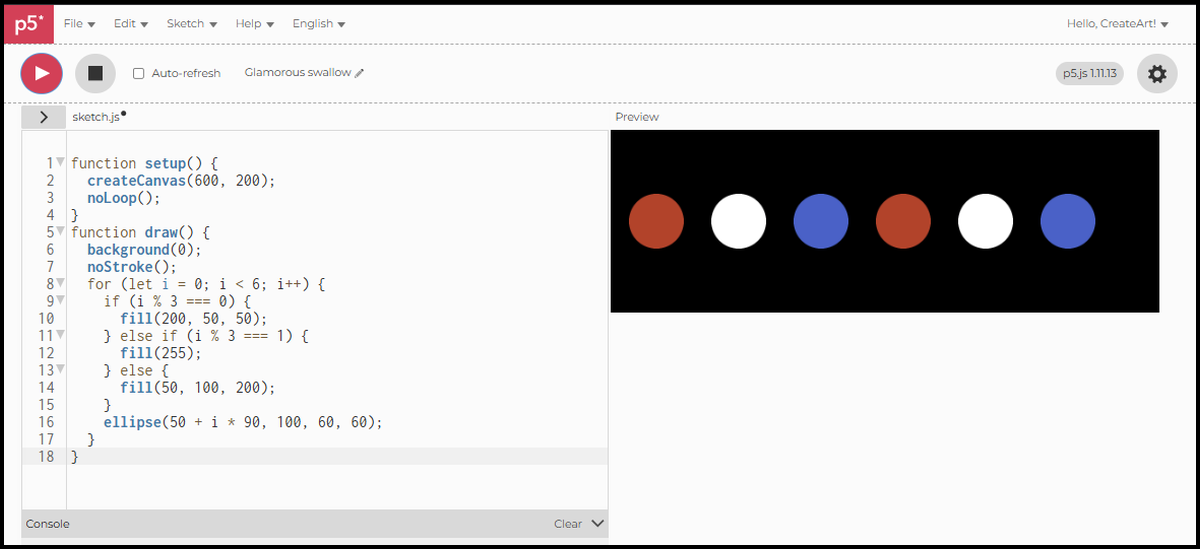
Two outcomes cover a lot, but sometimes you need more. else if lets you chain conditions. The sketch checks each one in order and runs the first branch that is true. If none match, else catches everything else.
function setup() {
  createCanvas(600, 200);
  noLoop();
}
function draw() {
  background(0);
  noStroke();
  for (let i = 0; i < 6; i++) {
    if (i % 3 === 0) {
      fill(200, 50, 50);
    } else if (i % 3 === 1) {
      fill(255);
    } else {
      fill(50, 100, 200);
    }
    ellipse(50 + i * 90, 100, 60, 60);
  }
}
// what each line does inside the loop:
// if (i % 3 === 0) <- check: is the remainder 0? (i = 0, 3)
// fill(200, 50, 50) <- yes: red
// else if (i % 3 === 1) <- no. check again: is the remainder 1? (i = 1, 4)
// fill(255) <- yes: white
// else <- remainder must be 2 (i = 2, 5)
// fill(50, 100, 200) <- blue
// ellipse(...) <- draw using whichever fill was seti % 3 cycles through 0, 1, and 2. The six circles get three colours in sequence, repeating twice across the row.
Into the grid
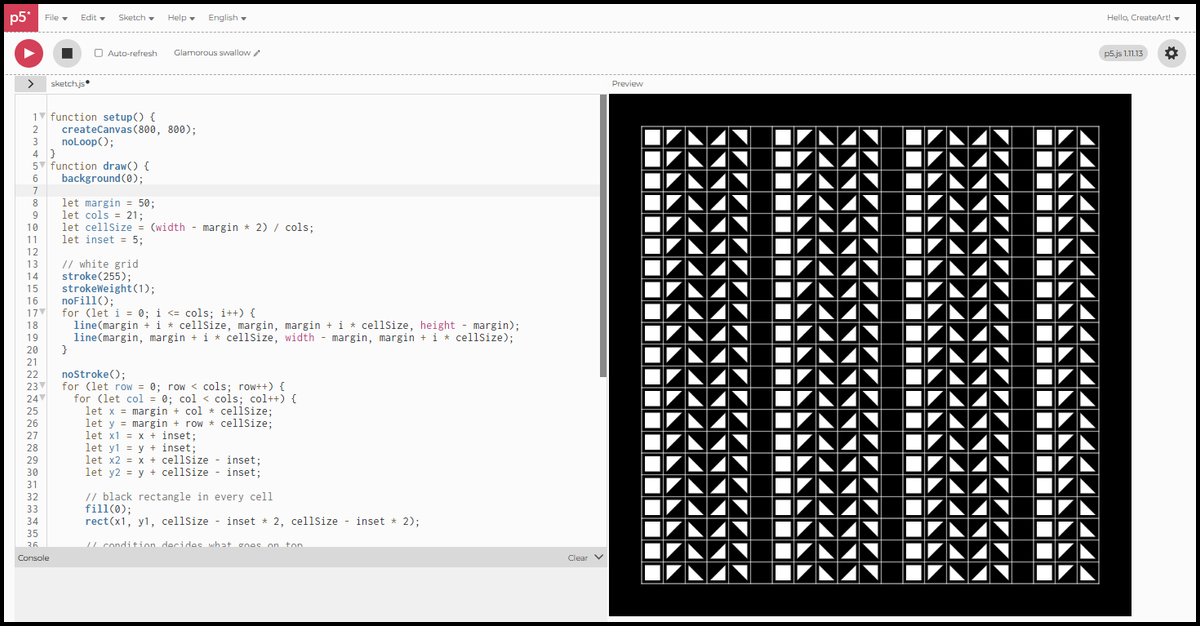
Now take all three forms of condition into a larger grid. This is a 21x21 grid on an 800x800 canvas with 50 pixels of margin on every side. Each cell starts with a black rectangle inset 5 pixels from the grid lines. A condition then decides what goes on top — six outcomes, black and white only.
function setup() {
  createCanvas(800, 800);
  noLoop();
}
function draw() {
  background(0);

  let margin = 50;
  let cols = 21;
  let cellSize = (width - margin * 2) / cols;
  let inset = 5;

  // white grid
  stroke(255);
  strokeWeight(1);
  noFill();
  for (let i = 0; i <= cols; i++) {
    line(margin + i * cellSize, margin, margin + i * cellSize, height - margin);
    line(margin, margin + i * cellSize, width - margin, margin + i * cellSize);
  }

  noStroke();
  for (let row = 0; row < cols; row++) {
    for (let col = 0; col < cols; col++) {
      let x = margin + col * cellSize;
      let y = margin + row * cellSize;
      let x1 = x + inset;
      let y1 = y + inset;
      let x2 = x + cellSize - inset;
      let y2 = y + cellSize - inset;

      // black rectangle in every cell
      fill(0);
      rect(x1, y1, cellSize - inset * 2, cellSize - inset * 2);

      // condition decides what goes on top
      let c = col % 6;
      if (c === 0) {
        fill(255);
        rect(x1, y1, cellSize - inset * 2, cellSize - inset * 2);  // full white
      } else if (c === 1) {
        fill(255);
        triangle(x1, y1, x2, y1, x1, y2);   // top-left triangle
      } else if (c === 2) {
        fill(255);
        triangle(x1, y1, x1, y2, x2, y2);   // bottom-left triangle
      } else if (c === 3) {
        fill(255);
        triangle(x2, y1, x1, y2, x2, y2);   // bottom-right triangle
      } else if (c === 4) {
        fill(255);
        triangle(x1, y1, x2, y1, x2, y2);   // top-right triangle
      }
      // c === 5: full black, nothing added
    }
  }
}
// inside the nested loop:
// x1, y1 <- top-left corner of the inset area
// x2, y2 <- bottom-right corner of the inset area
// fill(0) + rect <- black rectangle, drawn in every cell
// let c = col % 6 <- cycles through 0, 1, 2, 3, 4, 5 across columns
// if c === 0 <- full white: white rect covers the black one
// if c === 1 <- white triangle in the top-left corner
// if c === 2 <- white triangle in the bottom-left corner
// if c === 3 <- white triangle in the bottom-right corner
// if c === 4 <- white triangle in the top-right corner
// c === 5 <- full black: nothing added, black rect stayscol % 6 cycles through six values. With 21 columns, the pattern repeats three full times across the grid, with the first three outcomes appearing once more in the final columns. The grid runs the same nested loop from Session 4. The only new ingredient is the condition that decides what each cell contains.
In Session 7 we look at translate() and rotate(): translate() changes where you draw from, rotate() turns the canvas itself, and together they build a flower from rotated petals.