
In Session 4 the for loop knew in advance how many times to run. Sometimes you don’t know. You just want to keep going until something stops you.
The while loop
Think of filling a shelf with books. You don’t count them in advance. You pick one up from the pile, check whether there’s space, place it on the shelf, and repeat. The moment the shelf is full, you stop.
A while loop works the same way. It checks a condition before each run. If the condition is true, it runs. If it is false, it stops.
function setup() {
  createCanvas(400, 400);
  noLoop();
}
function draw() {
  background(0);
  fill(200, 50, 50);
  noStroke();
  let x = 50;
  while (x < width) {
    ellipse(x, 200, 40, 40);
    x += 70;
  }
}
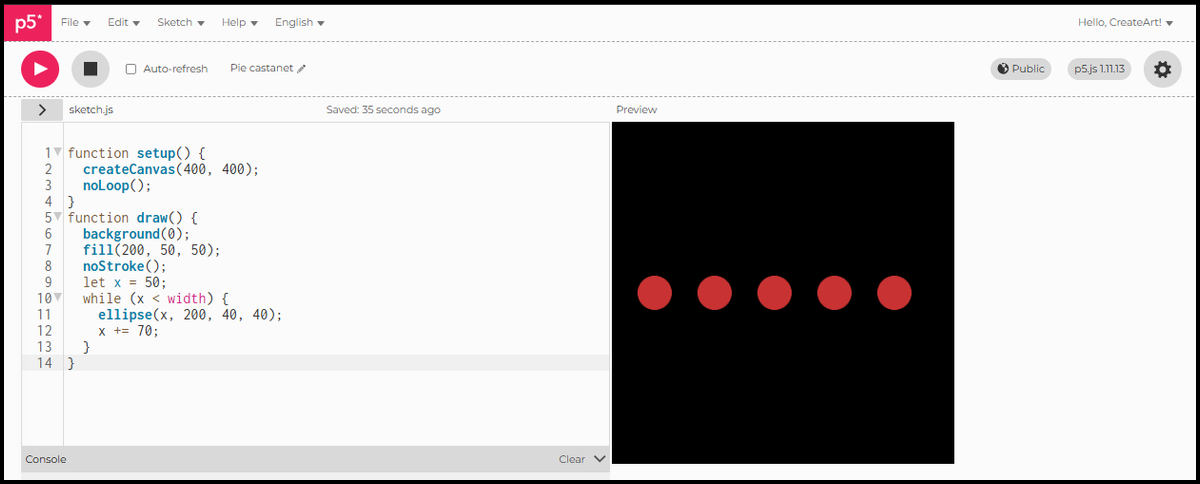
x starts at 50. After each circle, x increases by 70. The loop keeps going as long as x is less than the canvas width. When x reaches or passes 400, the condition is false and the loop stops. How many circles? p5.js works it out at runtime. You just described when to stop.
Shrinking rectangles
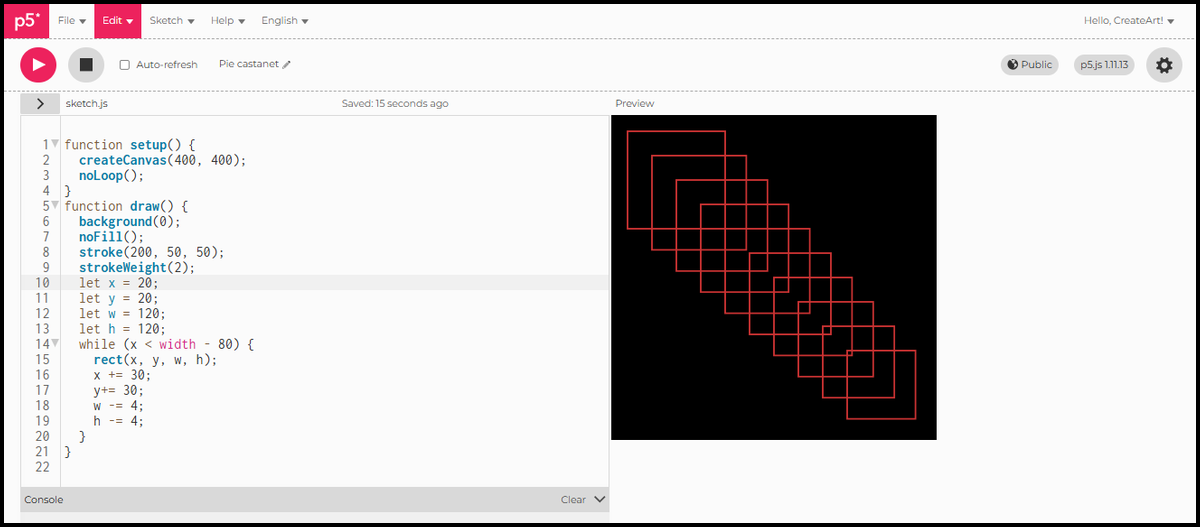
A while loop becomes more interesting when multiple things change with each step. Here four variables update together: x and y move the starting corner diagonally, w and h shrink the size. The condition is spatial: stop when x is 80 pixels from the right edge.
function setup() {
  createCanvas(400, 400);
  noLoop();
}
function draw() {
  background(0);
  noFill();
  stroke(200, 50, 50);
  strokeWeight(2);
  let x = 20;
  let y = 20;
  let w = 120;
  let h = 120;
  while (x < width - 80) {
    rect(x, y, w, h);
    x += 30;
    y += 30;
    w -= 4;
    h -= 4;
  }
}
Each rectangle steps 30 pixels down and to the right, and shrinks by 4 pixels on each side. No fill, just an outline: every rectangle layers over the last, and the overlapping edges create a staircase pattern across the canvas. Four things changing at once, one condition controlling when it stops.
Infinite loops
Every while loop needs something inside it that eventually makes the condition false. In the example above, x += 30 is that thing. Without it, x never changes, the condition stays true, and the sketch freezes. p5.js stops responding and you have to reload the page. Before running any while loop, check that the update is there.
In Session 6 we look at conditions: how to make different things happen in different parts of the canvas.